Brief Technical Description
The TELESIN Master Grip Kit is a magnetic MagSafe-style camera grip designed for the latest iPhones (particularly the “Pro”/Max models) that puts extra power, control, and ergonomics into mobile photography and videography. The grip incorporates a built-in 3,200 mAh battery, allowing extended shooting sessions without needing to plug in an external power bank. It magnetically snaps onto the iPhone surface (or a MagSafe-compatible case) providing a DSLR-style handle for better stability, zoom/shutter controls, and cut-away ergonomics built for creators. The kit also includes wireless charging support, ergonomic finger-hook design, thumb dial/joystick for zoom or mode switching, and a tripod mount/1/4“ screw socket for mounting lights or mics. The grip’s design is tailored for mobile filmmakers and photo-creators who want more control, more battery, and a more comfortable hold than just holding the bare iPhone.

My Firsthand Experience
Why I Bought It
As a photographer and videographer who uses my iPhone constantly on travel, ship decks, road trips and spontaneous creative detours, I often found myself battling two simultaneous frustrations: the slippery glass body of the iPhone (especially when shooting handheld on the move) and the fear of running out of juice mid-shoot. I’d lug a separate power bank, fumble for cables, and balance the phone awkwardly. I needed a solution that made the iPhone feel like a real camera—with better grip, decent extra power, yet still compact and mobile. When the TELESIN Master Grip popped up with a 3,200 mAh built-in battery, magnetic attachment and camera-style controls, it checked off enough boxes that I decided to give it a shot.
Setup + First Impressions
Out of the box the grip feels solid. The weight is noticeable but not burdensome—when attached it adds a chunk of mass to the phone, giving it a more “camera-body” feel, which I actually liked for stability. I clipped it onto my iPhone 16 Pro Max (in my case) with a MagSafe-compatible case and it snapped firmly. The magnet is strong, the fit secure. I charged the grip fully, then plugged in the iPhone and tested the wireless charging feature: the phone started to charge from the grip battery as promised—which means I could shoot while simultaneously topping up the phone’s battery.
The physical controls are nice: a thumbdial/joystick for zoom/mode switching, a shutter button, and a finger-hook grip that improves hold. First impressions: ergonomics are significantly better than bare-hand holding the phone for long video takes. The built-in battery won’t compare to a massive external power-bank, but for the form-factor it’s ample for most mobile-shoot scenarios.
Real-World Use
Over multiple sessions I tested the Master Grip in various environments.
On the Road
In a car on a scenic Texas Hill Country drive I used the grip for handheld 4K60 video. The added handle plus weight made the phone feel less jittery (compared to bare handheld). The built-in battery gave me extra peace of mind—not infinite power, but enough that I didn’t worry about the phone dying half-way through a spontaneous shoot.
On Deck / Travel Shoot
On a cruise deck under mixed lighting and motion I attached the grip, used the mount for a mic and went handheld capturing travel-story clips. The grip stayed solid, the magnet reliable despite the movement. However: after about 30–40 minutes of continuous video the grip’s battery began to draw noticeable heat and the phone felt warmer than bare. It didn’t shut down or fail — but if you’re doing marathon takes you may want to monitor.
Street Photography + Casual Use
For walking-shoots and urban exploration the grip adds convenience. The phone feels less like a phone and more like a camera, which changes how you shoot. I found myself holding the phone more confidently, framing shots with more precision. The downside: it’s bulkier and heavier than bare phone, so sometimes for ultra-light handheld walking I still went back to just phone.
Battery / Workflow
The 3,200 mAh extra battery wasn’t unlimited, but it extended my shoot time significantly. I found that with the phone plus grip attached I could shoot an extra hour or so of video before seeing battery concerns. The wireless charging worked well. The workflow was smooth: attach grip, shoot, then transfer footage as usual. The grip didn’t force a special app for basic operation (though optional features existed if you want them).
Edge Cases & Trade-Offs
- Weight/size trade-off: when you clip the grip on you’ll notice the added bulk — in my bag I had to reorganise.
- Heat: In a couple of cases (bright sun + video recording + grip battery active) things got warm. It didn’t kill the shoot but is a caveat.
- Battery capacity relative to standalone power banks: at 3,200 mAh it’s decent, but if you’re doing all-day multi-device shoots you might still need a large external bank.
- Mounting/accessory ecosystem: The grip is great, but if you heavily rely on filters, lens mods or external rigs you need to check compatibility (especially with thicker cases).
- Cost vs minimal usage: If you’re mostly doing short clips, photo-only work, or letting your phone internal battery suffice, you might not need this level of grip + battery.
The Bottom Line
If you shoot a lot with your iPhone—video, travel vlogging, handheld motion shots, more than casual use—and you’re looking for better hold + extra battery in a compact, mobile form-factor, the TELESIN Master Grip Kit is a strong pick. It upgrades the phone experience in a way that matters for creators. For casual photo takers or light video users, it may be over-kill (and perhaps bulkier than necessary). In my gear-bag it now lives when I know I’m shooting more than just “everyday moments.” It gives me confidence to film longer, hold steadier, and worry slightly less about battery.
Alternative Options Worth Considering
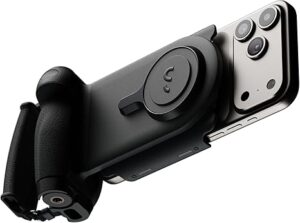
ShiftCam ProGrip Starter Kit
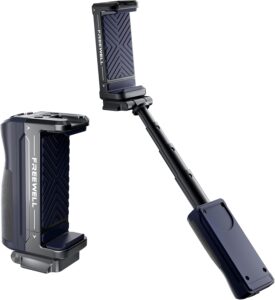
Freewell Versatile Selfie Grip
Jack’s Final Thoughts
Gear doesn’t make the photographer—but the right gear absolutely elevates the experience. With the TELESIN Master Grip I found the difference between “holding a phone” and “working with a mobile camera kit.” When the tool feels invisible in the flow but simply elevates it, that’s when it’s doing its job. For iPhone-creators who are serious enough to notice difference, this one earns a spot.